The Week in Review – 2025-51

🗺️ The probably last Bikerouter release this year brings one of the most requested features:
You can now set different routing settings on the individual segments of a route.
This makes it possible, for example, to explicitly include a road segment in a gravel route (or the other way around ;-)).
You can also take a road cycling loop that was planned with the “very little traffic” profile briefly over a road with a higher share of motor vehicles without having to place lots of individual waypoints in order to force the routing onto the desired path.
The use cases seem to be very diverse; at least that’s how I interpret the number of times this feature request has been brought to me.
You control the feature via the sidebar of the waypoint list (map pin icon on the right edge of the screen).
For each waypoint you can use the “Routing settings” link to show the usual selection fields for routing profiles and route alternative. The settings made here only affect the segment from the respective waypoint to the next waypoint in the route:
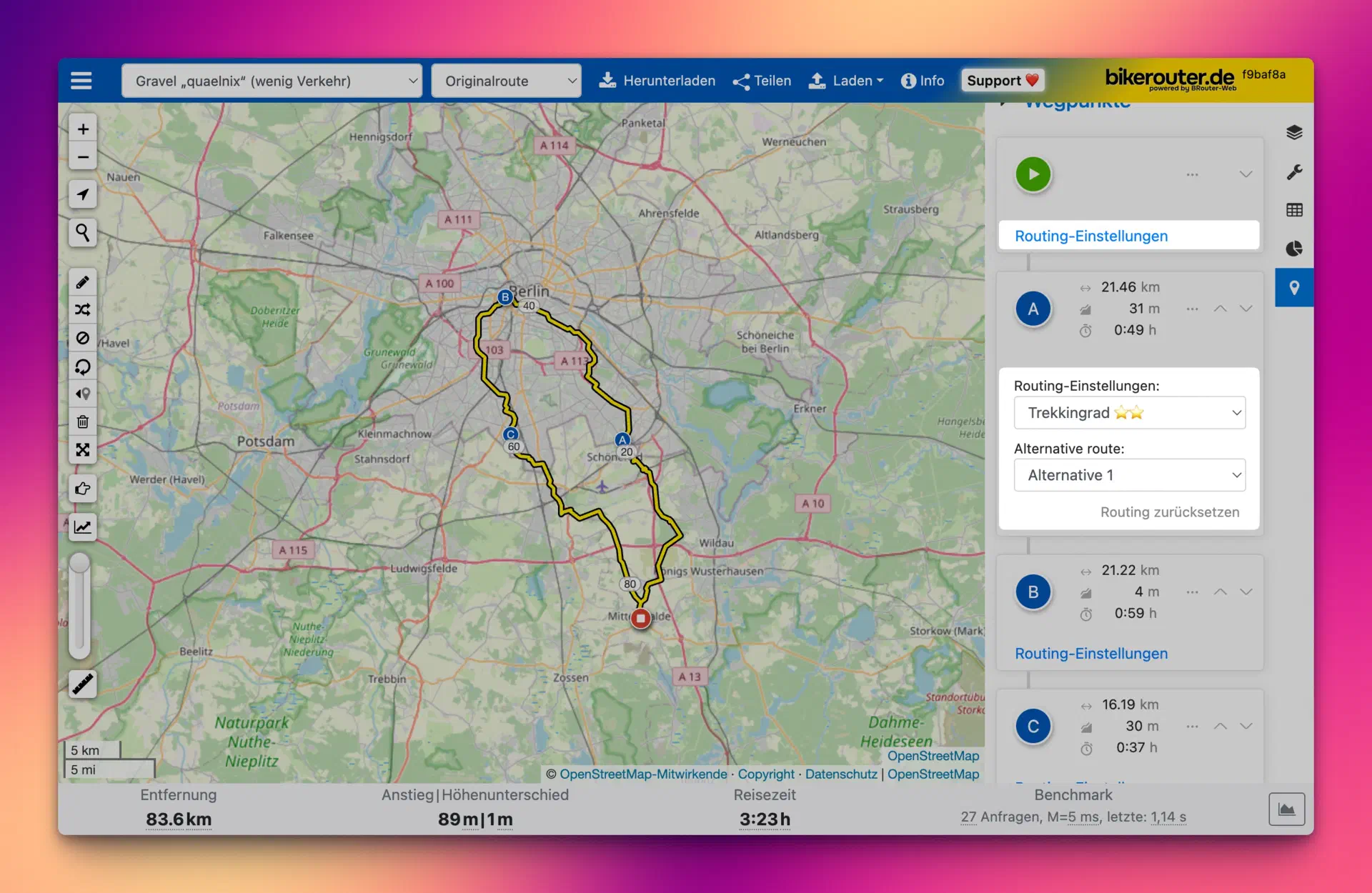
All other segments of the route are planned with the global settings, which are set at the top in the navigation bar or in the main menu.
The settings are stored as usual in the current link in the browser’s address bar, so they can be easily shared or saved as a bookmark. The short URL and QR code function (“Share” button) also supports the new feature, of course.
🎆 With the described feature, the year at Bikerouter is also coming to an end. As in the past two years, I’ve written a short review again:
📢 I publish some announcements around Bikerouter from the account @bikerouter@en.osm.town. This is hosted on a Mastodon instance and also has the well-known 500 character limit.
This limitation has annoyed me more often lately, so I quickly created a second Bikerouter account: @bikerouter@skylightaccess.de. Here the limit of 5,000 characters is much more relaxed.
In the future I will publish posts on both accounts and repost them respectively, so there will be no differences in content.
🌐 A few weeks ago I switched back from Firefox to Vivaldi as my default browser on Mac and iPhone. Since around 2008 I’ve been regularly switching the default browser multiple times per year for a few weeks and in doing so I keep an overview of the different programs.
Primarily, though, I have been a Firefox user from the very beginning; the first version I used was still called Phoenix back then.
I hope not, but it could well be that the Firefox era is now slowly coming to an end for me.
My temporary switch a few weeks ago had technical reasons: Firefox regularly pushed its memory usage into the double-digit gigabyte range within a short time after startup, so that the computer was gradually impacted by it. Certainly something that can be fixed by an upcoming update.
But it’s quite possible that my temporary use of Vivaldi will now become permanent. After the next Firefox release I’ll take another look to see whether the observed behavior of the far too high memory usage improves. If yes: great, then back to Firefox. If not, that may eventually be it.
It seems more and more that Mozilla now has completely different ideas than its user base about what a browser should be. That Mozilla is on the AI trip has been apparent for quite some time, and it also seems that this will remain the case.
In itself that’s completely fine with me, especially since these features are supposed to be “opt-in” for the time being.
What disturbs me: that Mozilla is throwing so many resources at solutions whose problems very likely don’t exist for a large portion of the remaining users, while at the same time neglecting the actual functions of a web browser1.
I will definitely continue to use the Developer Edition of Firefox for developing web apps; for normal day-to-day use I’ll try to somehow make friends with Vivaldi. And that will not be easy, since some learned workflows and features work differently in Vivaldi or don’t exist at all.
The list of my everyday software is always available at /defaults.
🗺️ The nerdiest thing I (re)discovered last week:
Here the river systems of the Earth are shown in a way that immediately makes it clear how things work.
You can easily sink a lot of time here just by scrolling around.
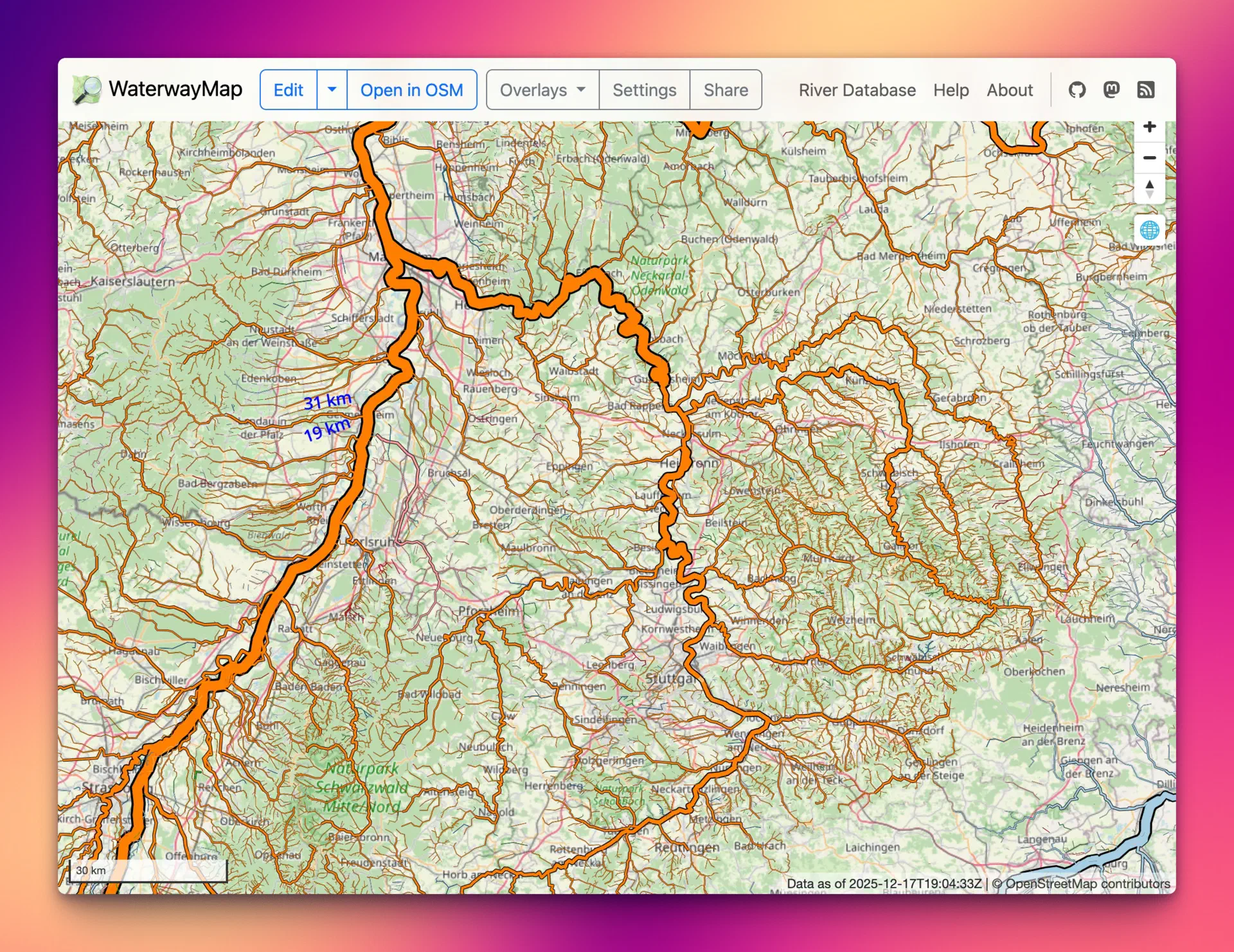
Also to be found there: the River Database. Here you can leisurely navigate through the rivers of the world, either via the top list of the longest rivers or via lists by name or country they flow through. For each river the tributaries are then shown (also navigable), and before you look at the clock again, an hour has easily passed.
Funny: Cloudflare Error Page Generator.
For when you’ve messed something up in production and want to look innocent.
🪗 Someone in the household might currently be practising some pretty exciting pieces on the accordion, including a medley of various Linkin Park songs and even “Sandstorm” by Darude.
The latter seems to be made for the accordion and can still be heard in every other techno set today.
The former, however, inspired me to listen to Linkin Park’s entire discography in chronological order again. That was a good plan and it brought back so many memories from the past 25 years :-)
🔊 Listened to this week:
Questions or comments?
Reply directly on Mastodon and your answer will show up here. Comments are only loaded from the Mastodon server after you click.